
Zendesk Connections
Add the Accoil widget to Zendesk Support tickets and Zendesk Sell leads so agents see engagement, activation, and adoption while they work.
Overview
With the Accoil integration for Zendesk, your Support and Sales teams get instant access to real-time product engagement data—right where conversations happen. No switching tabs, no digging for data.
By adding Accoil to Zendesk, you can:
- See user and account activity at a glance while handling tickets or leads
- Quickly assess engagement health, activation, and adoption
- Tailor responses and outreach based on real usage, not just guesswork
What you can do in Zendesk
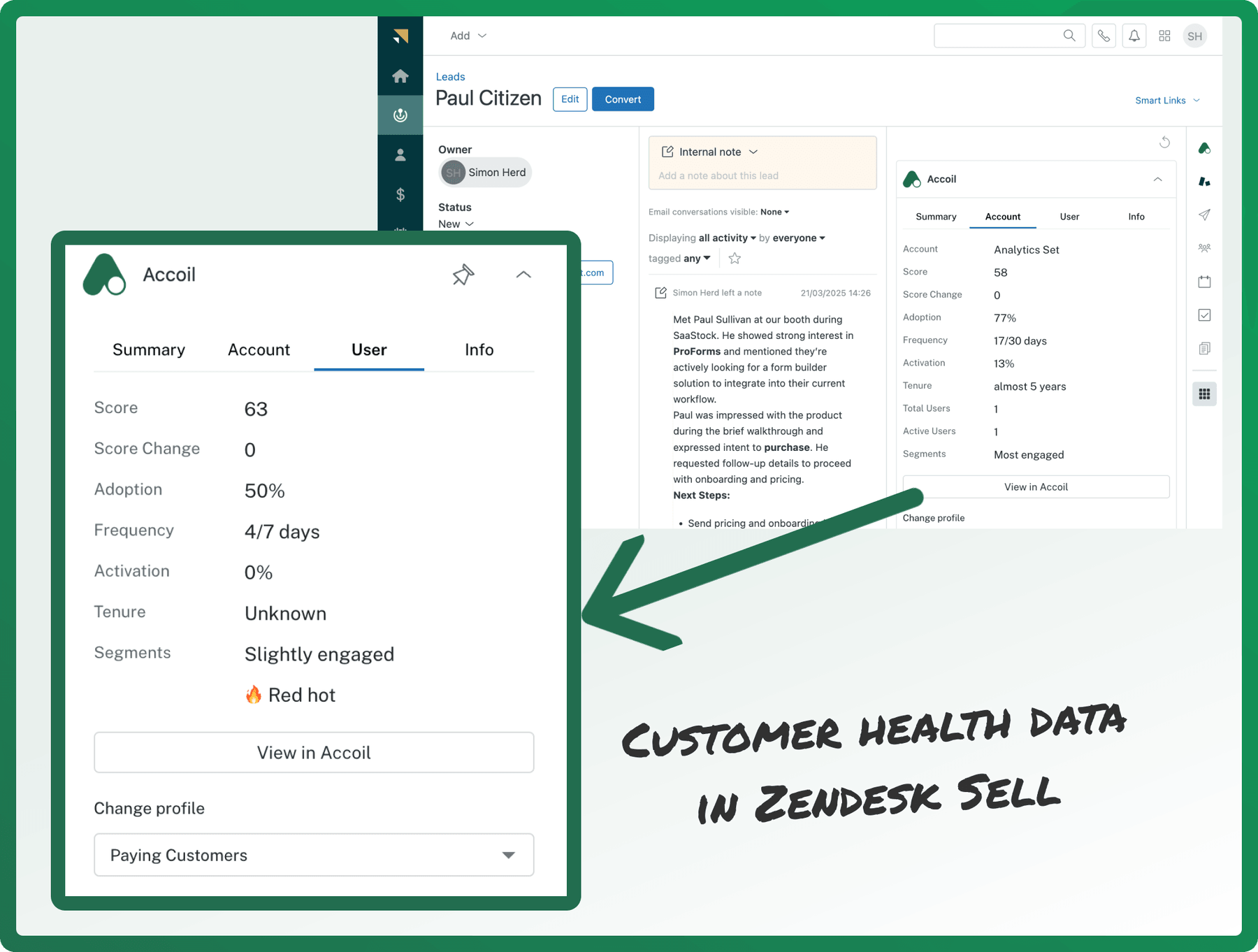
Where You'll See the Accoil Widget
Once installed, the Accoil widget appears automatically in both Zendesk Support and Zendesk Sell:
Zendesk Support
- Ticket Sidebar – See product engagement while resolving a support ticket
- Person Details Page – View user and account health in one place
Zendesk Sell
- Lead Details Page – See if a lead is active, activated, or needs nudging
- Person Details Page – Get key behavioral signals to guide your next step
What You’ll See in the Widget
The Accoil widget includes four tabs to give you a full view of the user and their associated account:
| Tab | Description |
|---|---|
| Summary | A high-level overview of account health, based on your configured summary workspace in Accoil |
| Account | Account-level metrics like engagement score, activation rate, and adoption trends |
| User | Individual user insights: last active, engagement score, segment membership, etc. |
| Info | Helpful definitions for interpreting what each metric means |
Data is live from Accoil and reflects the most up-to-date user and account activity.
Switching Workspaces
Engagement data in the widget is tied to your Accoil workspaces—like “Trial Users,” “Customers,” or “Power Users.”
If the widget looks empty or isn’t showing what you expect:
- Use the Workspaces dropdown at the bottom of the widget
- Select a different workspace that you have access to in Accoil
- Workspaces are shared across products, and switching views will refresh the data shown
Admin Setup & Configuration
How to Install
To install:
- In Accoil, go to Settings > Connections
- Find the Zendesk connection
- Click Install via Zendesk Marketplace
- Approve the app when redirected to Zendesk
- The Accoil app will now appear automatically in Zendesk
No additional configuration is required to enable the integration.
User Authentication
Each Zendesk user will need to log in to their Accoil account directly from the widget the first time they use it.
Once logged in, the widget will display engagement data for matched users and accounts.
No individual app setup or installation is needed—just log in once via the widget.
How Matching Works
Accoil matches Zendesk users to your Accoil workspace using the email address.
If the email on a Zendesk ticket, lead, or person matches a user in Accoil, the widget will automatically display data for that record.
Make sure the user’s email in Zendesk exactly matches the email in Accoil.
Use Cases by Team
| Team | How Accoil in Zendesk Helps |
|---|---|
| Support | Quickly assess user health and recent activity before responding |
| Sales | Tailor messaging to match product usage and identify qualified leads |
| Account Management | Spot upsell opportunities or early signs of risk from within Zendesk |
Troubleshooting
If the widget isn’t working as expected:
- Widget not visible? Make sure your Zendesk user has permission to view apps.
- No data showing? Check that the Zendesk contact email matches a user in Accoil in the workspace you are viewing
- Blank widget? Try switching to a different workspace using the dropdown.
Still stuck? Reach out to the Accoil team via chat or email—we’re here to help.
Summary
The Zendesk integration helps your team act with full context. Whether you’re solving support tickets or working a lead, you’ll have the product engagement insights you need—right there in your workflow.
If there’s something you’d like to do that isn’t supported yet, let us know! We’re always improving Accoil based on real-world feedback.