
HubSpot Connections
Sync Accoil traits onto HubSpot contacts and companies, add the Accoil widget to records, and create tasks from your automation rules.
Overview
The Accoil–HubSpot integration brings product usage insights directly into your CRM. Whether you’re qualifying leads, managing accounts, or running lifecycle campaigns, this integration lets you take action based on real user behavior.
By connecting Accoil to HubSpot, you can:
- Sync engagement scores, segments, and other traits to contacts and companies in HubSpot
- View real-time usage insights via the Accoil widget on contact and company records
- Trigger automated or manual follow-ups using HubSpot tasks or timeline events
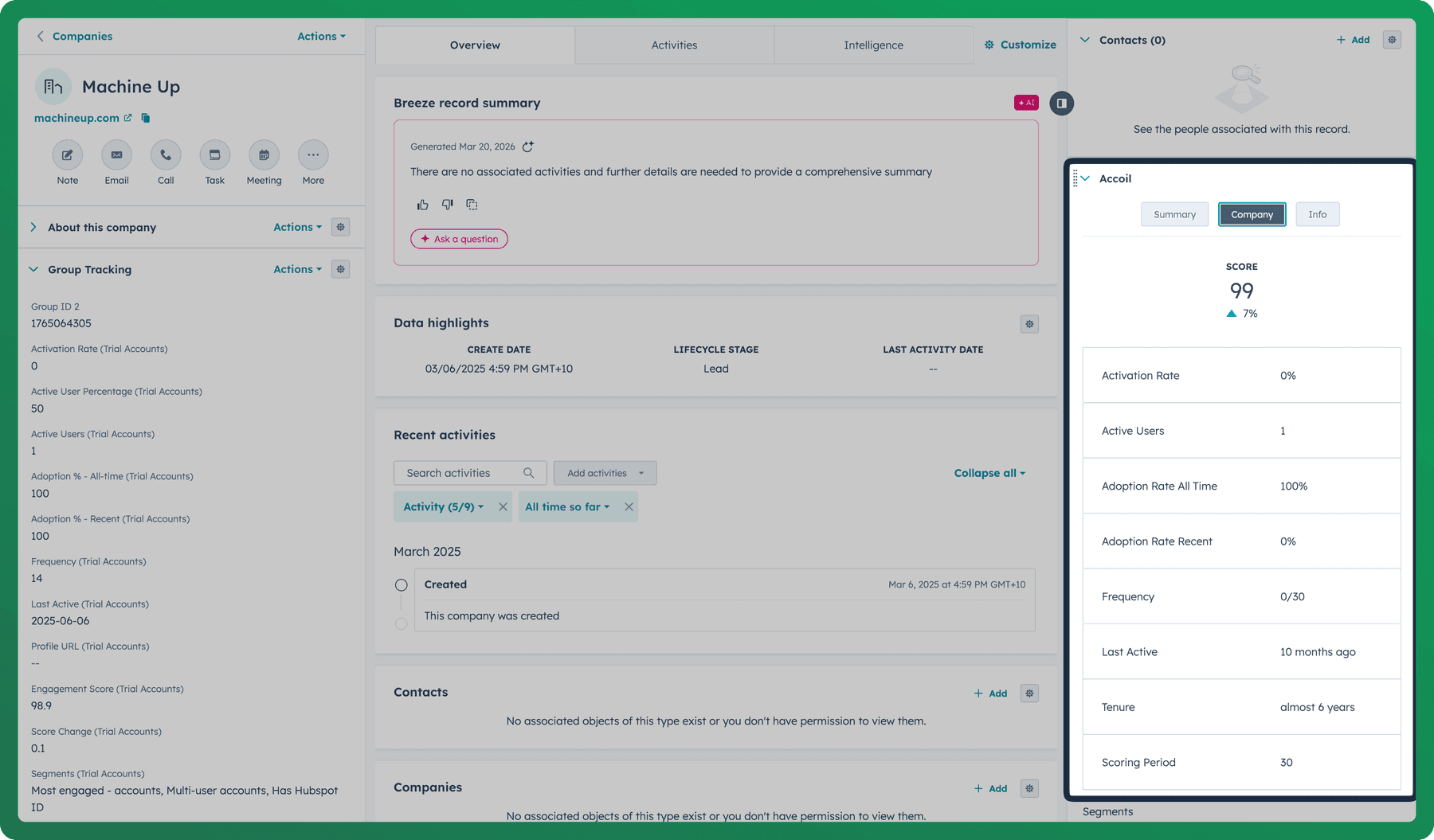
What you can do in HubSpot
Use Accoil Traits in HubSpot
Accoil syncs user and company traits into HubSpot every 6 to 24 hours. These traits can be used for:
- List building and segmentation in HubSpot
- Targeted marketing workflows
- Lead scoring or lifecycle triggers
- Account health tracking
Where to Find These Traits
- Traits are added to a custom Accoil group of properties in HubSpot
- You’ll find them in Contact and Company properties
- They follow the format:
Accoil [WorkspaceName] [TraitName]_(spaces removed from the workspace name)_
Example: Accoil_TrialUsers_EngagementScore
Displaying Traits in HubSpot
To view these traits on a contact or company record:
- Open the record
- Click Edit View
- Add the relevant Accoil properties to your visible fields
Once added, these properties can be used in:
- Filters
- Lists
- Reports
- Workflows
Viewing Accoil Insights in the HubSpot Widget
Once connected, the Accoil app can be added to your HubSpot contact and company views. You can also install it directly from the HubSpot App Marketplace.
The widget appears on the right-hand side of a record and includes the same four tabs used across Accoil’s integrations:
| Tab | What it shows |
|---|---|
| Summary | A high-level overview of account health, based on your configured summary workspace |
| Account | Group-level metrics like engagement score, activation, adoption, and segment membership |
| User | User-specific data: engagement score, last active, usage frequency, etc. |
| Info | Definitions and context to help interpret what you're seeing |
The widget reflects real-time data from Accoil and supports workspace switching using the dropdown at the bottom.
Take Action from Accoil in HubSpot
You can trigger actions in HubSpot directly from Accoil—both automatically through rules and manually via the UI.
Automation Actions
Within Accoil Automation Rules, you can configure HubSpot as a destination for two types of actions:
- Create Task Assigns a task to the owner of a contact or company in HubSpot
- Add Timeline Event Adds a custom event to the company’s timeline, useful for tracking key milestones or behavioral triggers
Manual Actions
You can also manually create HubSpot tasks from within Accoil:
- From any individual user or group workspace
- Or by selecting multiple users or groups in a list view
Open the Actions menu, then choose Create HubSpot Task to assign next steps inside HubSpot.
Admin Setup & Configuration
How to Connect Accoil to HubSpot
- In Accoil, go to Settings > Connections
- Select HubSpot, then click Connect
- Authorize Accoil to access your HubSpot workspace
- Once authorized, the widget and data sync will be enabled
You can also find and install the Accoil app from the HubSpot Marketplace to add the widget to your record views.
What Traits Are Synced
You have full control over which traits are synced and from which Accoil workspaces.
Workspace Sync Control
-
Enable or disable syncing for each workspace
-
For each enabled workspace, you can choose to sync:
- Segment names only, or
- All traits, including engagement, activation, adoption, etc.
Naming Format
Synced traits follow this naming pattern:
Accoil_[WorkspaceName]_[TraitName]- All spaces in the workspace name are removed
- Traits appear in the Accoil property group in HubSpot
Example: Accoil_PayingCustomers_ActivationRate
Automatic Cleanup
If you:
- Disable a workspace, or
- Change sync settings (e.g. from all traits to segment names only)
Accoil will automatically archive the previously synced properties for that workspace in HubSpot.
How Matching Works
Default Matching
By default, Accoil matches records using:
- Users → matched to Contacts via email address
- Groups → matched to Companies via company name or company domain
Custom Matching
You can override the default matching logic to use custom traits in Accoil and custom properties in HubSpot.
To do this:
- Choose the Accoil trait you want to use for matching (e.g.
tracking_id) - Select the corresponding HubSpot property to match against
For custom properties to be available for matching, they must be set as unique fields in HubSpot. If a property is not marked as unique, Accoil cannot use it for matching.
Use Cases by Team
| Team | How Accoil + HubSpot Helps |
|---|---|
| Sales | Prioritize leads by product usage; assign follow-ups automatically |
| Marketing | Build lifecycle campaigns based on activation or segment entry |
| Customer Success | Monitor engagement and health signals from accounts in your pipeline |
| Support | Reference usage context when reviewing tickets in HubSpot Service Hub |
Troubleshooting
- Widget not visible? Make sure the Accoil app is added to your contact or company view
- Traits missing? Ensure the workspace is enabled for sync, and that the trait type is set to “All traits”
- No match? Check if the user or group has the matching trait in Accoil and that the HubSpot property is marked as unique (if using a custom match)
Still stuck? Reach out to Accoil support via chat or email.
Summary
The HubSpot integration connects product insights to the heart of your customer workflows. From synced traits to embedded widgets to automated follow-ups, Accoil helps your team respond faster, prioritize smarter, and engage more effectively—right from your CRM.
Have suggestions or need something more? Let us know—we’re building with your workflows in mind.
Connect Atlassian Marketplace to Accoil
Connect an Atlassian Marketplace partner account to Accoil, find the required vendor and product IDs, and sync app license data to matching accounts.
Intercom Connections
Bring real-time product engagement data into Intercom to personalize conversations and automate targeting.