
Jira Service Management Connections
Install the Accoil widget in Jira Service Management so agents see account and user engagement in the request sidebar while handling tickets.
Overview
The Accoil integration for Jira Service Management gives your support team instant access to real-time product engagement data—right alongside every issue or request. No switching tabs, no digging through tools.
By adding Accoil to Jira Service Management, your team can:
- See user and account activity at a glance while handling requests
- Quickly assess engagement health, activation, and adoption
- Respond with greater context and prioritize high-value or at-risk customers
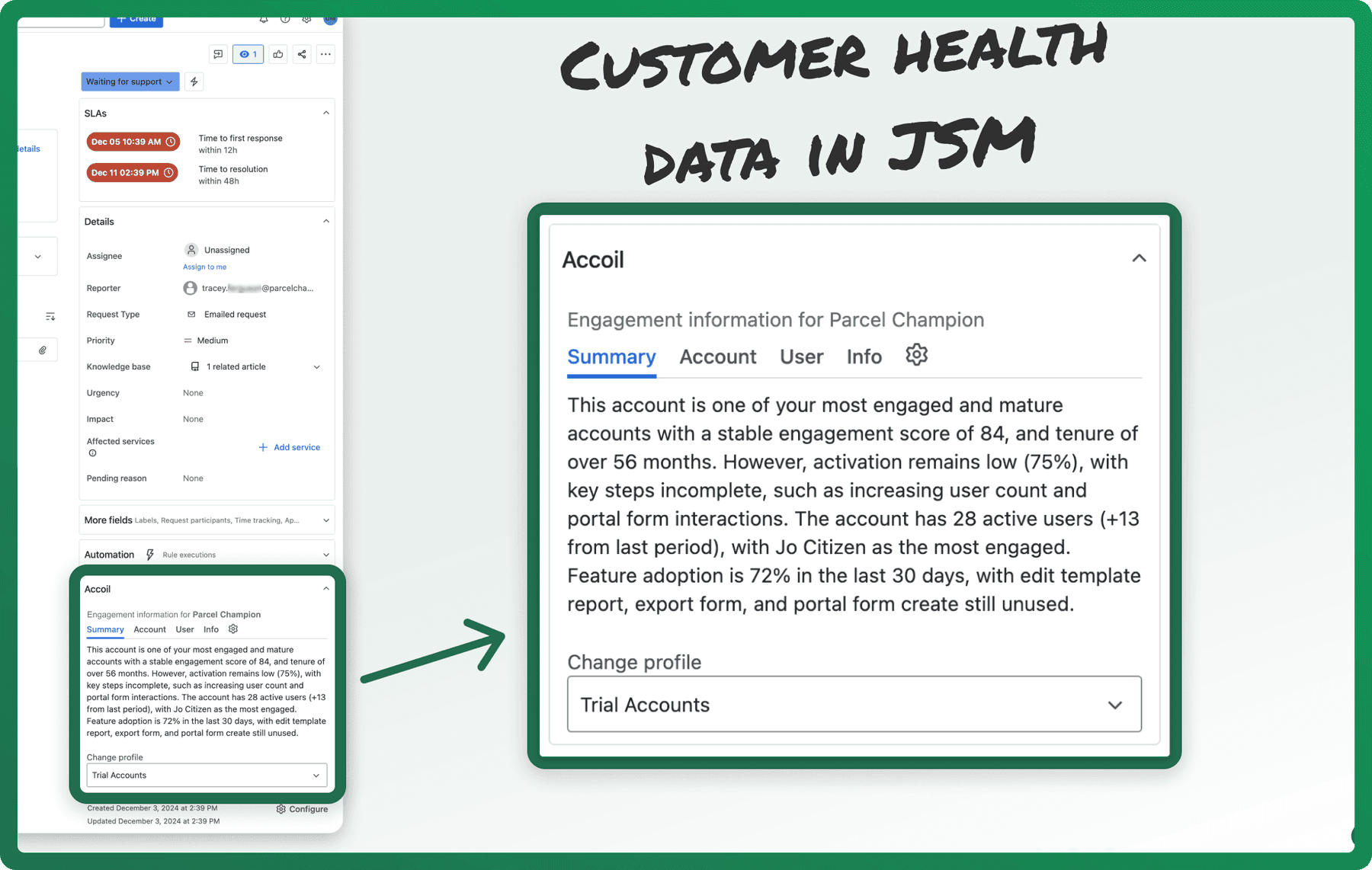
What You Can Do in Jira
Where You'll See the Accoil Widget
Once installed, the Accoil widget appears automatically within Jira Service Management tickets.
- Request Sidebar – See live user and account insights directly in the ticket view
This gives your support agents immediate context—without needing to leave Jira.
What You’ll See in the Widget
The widget includes four tabs to give you a complete picture of the user and their associated account:
| Tab | Description |
|---|---|
| Summary | A high-level overview of account health, based on your configured summary workspace in Accoil |
| Account | Group-level metrics like engagement score, activation rate, adoption, and segment membership |
| User | User-specific insights: engagement score, last active date, usage frequency, and segments |
| Info | Definitions and context for each metric to help you interpret the data quickly |
All data is live from Accoil and reflects the most up-to-date product behavior.
Switching Workspaces
The data shown in the widget is tied to your Accoil workspaces—such as “Trial Users,” “Paying Customers,” or “Power Users.”
If the widget appears blank or not as expected:
- Use the Workspace dropdown at the bottom of the widget
- Select a different workspace that you have access to in Accoil
- Switching workspaces refreshes the data shown in real time
Admin Setup & Configuration
How to Install
The Accoil app is available now via the Atlassian Marketplace and is free to install.
To install:
- In Accoil, go to Settings > Connections
- Find the Jira Service Management connection
- Click Install via Atlassian Marketplace
- Follow the prompts to authorize and install the app
- The Accoil widget will now appear automatically in your Jira Service Management tickets
No additional configuration is required once the app is installed.
User Authentication
Each Jira user will need to log in to their Accoil account directly from the widget the first time they access it.
- Once logged in, the widget will show engagement data for matched users and accounts
- Users only need to authenticate once
No extra setup or installation is required for individual users—just login via the widget.
How Matching Works
Accoil matches users in Jira to users in your Accoil workspace using the email address.
If the email associated with the reporter or customer in Jira matches a user in Accoil, the widget will automatically display their data.
Ensure the email in Jira exactly matches the user’s email in Accoil.
Use Cases by Team
| Team | How Accoil in Jira Helps |
|---|---|
| Support | Quickly assess user health and usage before responding to requests |
| Success | Identify at-risk users or newly onboarded customers needing attention |
| Product & Ops | Understand feature adoption directly within issue resolution workflows |
Troubleshooting
If the widget isn’t working as expected:
- Widget not visible? Confirm the app is installed and your user has permission to view apps in Jira
- No data showing? Make sure the Jira user’s email matches a user in Accoil (for the selected workspace)
- Blank widget? Try switching to a different workspace using the dropdown in the widget
Still stuck? Reach out to the Accoil team via chat or email—we’re here to help.
Summary
The Jira Service Management integration helps your team resolve issues faster and with more context. By seeing real-time user and account engagement data alongside every request, your support and success teams can take action confidently—right from where they already work.
Have ideas for what else we should support? Let us know—we build Accoil with your workflows in mind.
Intercom Connections
Bring real-time product engagement data into Intercom to personalize conversations and automate targeting.
LLM Connections (OpenAI, Claude & Perplexity)
Manage the OpenAI, Claude, and Perplexity connections Accoil uses to write summaries, supply your own API key, or disable a model entirely.