
Data Configuration
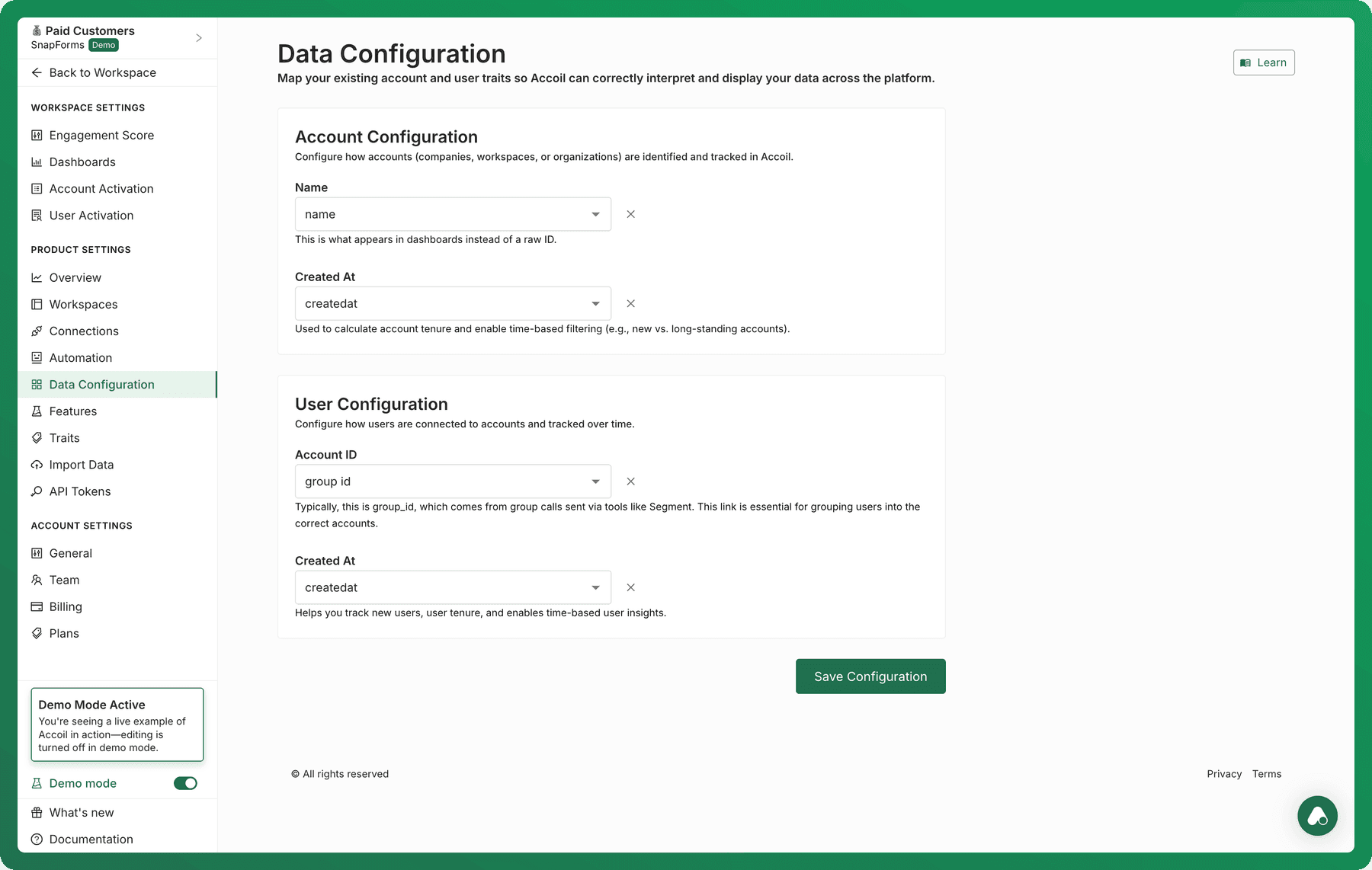
To enable accurate user-to-account mapping and unlock powerful account-level and user-level insights in Accoil, you’ll need to configure the appropriate traits under Data Configuration.
Why This Matters
Accurate trait configuration ensures that Accoil can:
- Link users to the correct accounts
- Display account and user names meaningfully in the UI
- Determine account and user tenure
- Enable accurate scoring, segmentation, and reporting at both the user and account level
Without this configuration, you may experience:
- Placeholder IDs instead of account or user names
- Inaccurate attribution of user activity
- Incomplete or misleading analytics
How to Configure Traits in Accoil
- Navigate to Settings → Data Configuration.
- You'll see two sections:
- Account Configuration
- User Configuration
🔹 Account Configuration
Define how Accoil identifies and tracks accounts (such as companies, organizations, or workspaces).
Fields to Configure:
-
Name Choose the trait that represents the account’s display name (e.g.,
name,account_name). This is shown in dashboards and throughout the UI to help you easily recognize accounts.
-
Created At Select the trait that captures when the account was created (e.g.,
createdat).This powers tenure-based filters like "new vs. long-standing accounts" and enables account aging insights.
🔹 User Configuration
Define how Accoil tracks users and associates them with the correct accounts over time.
Fields to Configure:
-
Account ID Select the trait that identifies which account the user belongs to (e.g.,
group_id,account_id,org_id).Typically, this is
group_id, which comes from group calls sent via analytics tools like Segment. This is essential for connecting users to the right accounts. -
Created At Choose the trait that indicates when the user was first created (e.g.,
createdat).This helps you track user tenure and enables time-based user insights.
✅ Save Your Configuration
After selecting the correct traits in each section, click Save Configuration to apply your settings.
Can’t Find the Trait You Need?
If a trait you expect isn’t showing up in the dropdown:
- Ensure the relevant data has been sent to Accoil via your data source (e.g., Segment, RudderStack).
- Contact your developer or data team to verify that the correct properties are being passed.
- Refer them to developer.accoil.com for integration guidance.
Summary
Trait configuration is a foundational step that ensures Accoil works properly across your workspace. By correctly mapping account and user traits:
- Product managers get reliable activation and engagement insights.
- Sales and success teams can segment and prioritize accounts more effectively.
- Support teams can understand account history and user context.
- Marketing can target campaigns based on account age and engagement.
Take a few minutes to set it up right—you’ll unlock far more value across your teams.